This is the write-up for Assignment 01 of GAMES 6320 (Game Engineering II). The assignment starts from a provided EAE6320-style engine and asks you to do a handful of things that sound small but expose a lot of how the engine is put together: introduce a new Graphics static library, split platform-specific rendering code correctly, create a second game project (MyGame) alongside the example game, hook up the asset build pipeline, and then make that game do something visible - an animated triangle - with a game-specific shader.
The point of the assignment is less “draw a triangle” and more “prove you understand how a multi-project, multi-platform engine is assembled and built.”
Download
Release build (Direct3D): Download the Release Build
Release build (OpenGL): Download the Release Build (OpenGL)
Controls: No player input is required for this assignment (the only input handled by the starter code is ESC, which exits the application).
Result
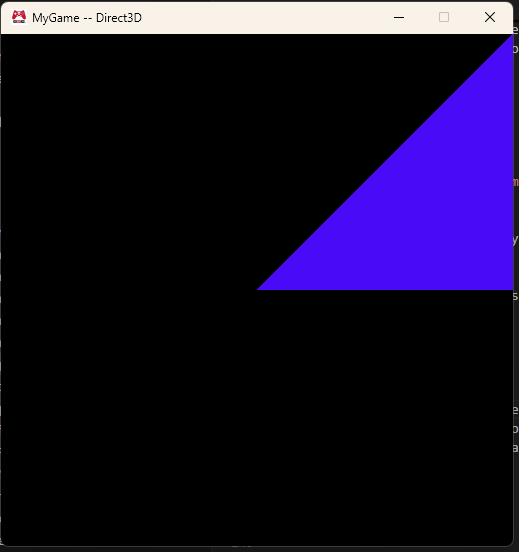
The finished MyGame renders a single triangle and animates its color over time, so instead of sitting at the default white it drifts through a range of colors as the simulation clock advances. The color is computed in a custom fragment shader and is identical on both rendering backends.
The window title is also platform- and configuration-aware:
- OpenGL debug:
MyGame -- OpenGL -- Debug - OpenGL release:
MyGame -- OpenGL - Direct3D debug:
MyGame -- Direct3D -- Debug - Direct3D release:
MyGame -- Direct3D
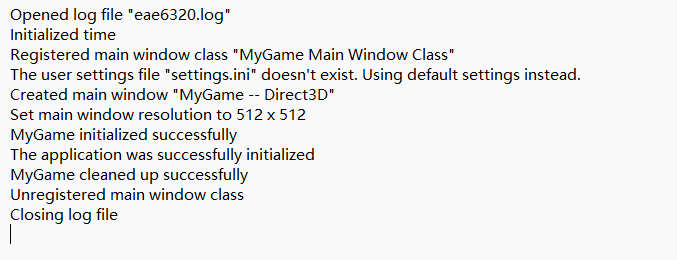
The game also writes two lines to the generated log file (eae6320.log):
|
Graphics Static Library
The first real piece of work is turning the graphics system into a proper static library named Graphics, living under Engine/Graphics. Before this, the solution shipped without a Graphics project at all - the graphics source files were provided separately - so the job was to drop them into the engine, create the project, and wire it into the rest of the solution.
Why a static library instead of just compiling the graphics .cpp files into every game? Because the engine is organized as a set of small, focused static libraries (Application, Logging, Platform, Concurrency, Math, Graphics, and so on). Each library owns one concern, and the games link against the libraries they need. That keeps build times and dependency surfaces manageable and makes the boundaries between systems explicit.
The interesting part is how the platform split works. Graphics has a shared interface (Graphics.h, cShader.h, cRenderState.h, …) and two platform-specific implementation folders:
Direct3D/- used by the x64 configurationsOpenGL/- used by the Win32 configurations
The project file controls which folder gets compiled with ExcludedFromBuild conditions. The Direct3D/*.d3d.cpp files are excluded from the Win32 configurations, and the OpenGL/*.gl.cpp files are excluded from the x64 configurations. This means each configuration only ever compiles the code for the backend it actually uses. The platform macro comes from property sheets: OpenGL.props defines EAE6320_PLATFORM_GL and Direct3D.props defines EAE6320_PLATFORM_D3D, both along with EAE6320_PLATFORM_WINDOWS.
That split matters beyond just “compile the right files.” It keeps Direct3D types out of OpenGL translation units and vice versa, and it makes the intended platform mapping explicit in one place.
Project References
Adding references correctly turned out to be the most instructive part of the assignment. The rule the assignment is teaching is:
A project reference (a link dependency) is only needed when one project calls a function that is defined in a .cpp file of another project.
Using a type, an enum, or a header-only declaration does not require a reference.
Who needs Graphics?
I searched the solution for Graphics:: and looked at which usages are actual function calls into the Graphics library:
Engine/Applicationcalls the realGraphicsAPI -Graphics::Initialize,Graphics::CleanUp,Graphics::RenderFrame,Graphics::SubmitElapsedTime, and the frame submission functions. Those are defined inGraphics.d3d.cpp/Graphics.gl.cpp, soApplicationis the project that needs a reference toGraphics.
So Application is the only project that needed a Graphics reference. MyGame and ExampleGame link against Application, and they get Graphics transitively.
Who mentions Graphics:: but does not need a reference?
ShaderBuilder is the clean example. Its source uses Graphics::eShaderType to decide which shader profile to compile. But eShaderType is just an enum class declared in a header. The ShaderBuilder never calls a function defined in a Graphics .cpp file, so it needs the header on its include path but no link dependency on Graphics.
That distinction - namespace usage vs. linker dependency - is the thing I want to remember going forward.
Graphics‘s own references
Graphics itself links against Asserts, Concurrency, Logging, Platform, UserOutput, Windows, and OpenGlExtensions. Those are the projects whose compiled functions the graphics implementation actually calls.
Creating MyGame
Creating MyGame was mostly mechanical, but there is one subtlety that is easy to get wrong: you cannot just copy ExampleGame byte-for-byte.
Visual Studio projects carry a ProjectGuid, and two projects in the same solution cannot share one. So the process is:
- Create a fresh
MyGameproject (which generates a new, unique GUID). - Copy the example game’s source/
.propsfiles in and rename them. - Replace the generated GUID with the one from the new project.
- Rename the class from
cExampleGametocMyGameand update the include guards and#includedirectives.
There is also a naming distinction the assignment is particular about:
- The disk folder is
MyGame_(with a trailing underscore). - The Solution Explorer filter and project are
MyGame(no underscore).
The MyGame.props file sits in MyGame_/ but outside MyGame_/MyGame/, and it defines GameName as MyGame_, which drives the $(GameInstallDir) used to stage the finished game.
The BuildMyGameAssets project is a separate, intentionally empty project whose whole job is to run the asset build step. It does not compile game code; it depends on the asset tools and invokes them on the game’s AssetsToBuild.lua. Keeping it separate is what lets the TA test “build the game only” and get a game with no assets, which is the correct behavior.
Asset Pipeline
The asset pipeline is the part I had to trace most carefully. The flow is:
|
AssetsToBuild.lua lists source assets. For example, it lists Shaders/Fragment/standard.shader and my Shaders/Fragment/animatedColor.shader. The build system looks for each source file in the game’s content directory first, then in the engine’s content directory. The shader builder then preprocesses/compiles the source into the built asset under $(GameInstallDir)/data/shaders/....
The distinction that matters is source asset vs. built asset. The game does not load from Content/ at runtime. It loads from data/ relative to the install directory. That is why deleting temp/ and building only the game project produces an executable that cannot find its shaders - the game binary exists, but the built data/ folder does not until BuildMyGameAssets runs.
Animated Fragment Shader
For the visible result, I copied the engine’s standard.shader fragment shader to MyGame_/Content/Shaders/Fragment/animatedColor.shader, added it to AssetsToBuild.lua, and changed both Graphics.d3d.cpp and Graphics.gl.cpp to load it instead of standard.shader.
The shader uses the frame constant buffer’s g_elapsedSecondCount_simulationTime to drive the color. The same math is written once for HLSL and once for GLSL:
|
Because sin/cos stay in [-1, 1], each channel stays in [0, 1]. Using different frequencies keeps the color drifting in a way that is clearly not white and clearly changing. Keeping the HLSL and GLSL formulas identical is what makes the two backends look the same.
Logging
The starter engine already has a Logging system, so I just used it rather than inventing anything new. cMyGame::Initialize() writes:
|
and cMyGame::CleanUp() writes:
|
Both end up in eae6320.log next to the executable. Lifecycle logging like this is useful after the fact: if something goes wrong, the log tells you how far initialization got before it failed, and whether cleanup ever ran.
Engine Codebase Thoughts
A few things stood out from actually reading the engine while doing this:
- Small static libraries with clear names.
Application,Graphics,Logging,Platform,Concurrency,UserOutput, etc. This makes the dependency graph legible: you can usually tell who needs whom from theProjectReferencelists. - Property sheets do the platform configuration. Instead of repeating preprocessor definitions in every project,
OpenGL.propsandDirect3D.propsset the platform macros, and projects import the right one per configuration. - Common code vs. platform code.
Graphicskeeps the interface shared and pushes backend-specific work into.d3d.cpp/.gl.cppfiles selected by configuration, which is a clean way to keep two renderers in one library. - The asset pipeline is genuinely a pipeline. Source content is authored, listed, built, and then installed to
data/. The separation between source and built assets is easy to miss until a clean build fails to produce them.
Problems / Things Learned
The most useful realization was the namespace-vs-linker point described above: seeing Graphics:: in a file does not mean that project links against Graphics. It depends on whether the symbol is an enum/header declaration or a function defined in a .cpp.
Clean builds exposed dependency order in a way incremental builds hide. A solution can pass on the second build but fail the first time if the asset project’s dependencies are not declared; testing from a deleted temp/ folder is the only way to catch that.
Configuring platform-specific .cpp files correctly (ExcludedFromBuild) was also something I had to check carefully - getting Direct3D into a Win32 build or OpenGL into an x64 build is exactly the kind of mistake that only shows up as a confusing compile error.
Finally, keeping HLSL and GLSL behavior identical requires writing the same logic in two shader languages and remembering that both must produce colors in [0, 1].
Local note: on this machine, Release builds were intermittently blocked by Windows Smart App Control flagging freshly built unsigned binaries. This is a local OS-policy issue, not part of the assignment, and it is documented in the acceptance report.
Expectations for the Class
From the first assignment I expect the rest of the course to keep building on this same foundation: more engine systems as static libraries, a real rendering pipeline that grows beyond one triangle, a proper asset pipeline, and an increasing focus on production-style engine organization and build discipline. I am most interested in graphics abstraction and asset/tooling pipelines.
Beyond that, I am really hoping the class gets into AI-agent and generative engineering topics. I want to learn how agentic tooling can fit into a real C++/game-engine workflow: AI-assisted code generation, automated asset and build pipelines driven by language models, and using agents to take over the repetitive config/refactor/build work that this assignment required by hand. It would be great to figure out where those tools genuinely help a game engineer and where they still fall short.