GAMES 6320 · Engine System · Write-Up
Data-driven AI state machines: the run-time library, the builder and how to use them
A finite state machine library for game AI. States, transitions and conditions live in a readable .fsm file, a builder turns it into a binary file, and the game only sets parameters and reacts to state changes. Includes the code ZIP, installation steps and examples.
Course: GAMES 6320-001 Game Engineering II (Fall 2026)
Author: Feiyang Yang
Play the demo (one click, ZIP): MyGame_EngineSystem_Release_x64.zip
A Direct3D Release build (x64). Unzip it and run
MyGame.exe.
Controls: arrow keys move the player (the colored sphere);Hhits the guard;Llocks or unlocks the door while it is closed;Space(held) turns the player into a cone;WASDmove the camera;Escquits.Use it in your own game (code, ZIP): EngineSystem_StateMachine.zip. The run-time library, the builder, two example files and a README with the installation steps. Sections 5 and 6 below repeat the important parts.
1. What my project does
My engine system is a finite state machine library for game AI. You write the states of an agent, the transitions between them and the conditions for each transition in a human-readable .fsm file. A builder turns that file into a small binary file as part of the asset build. At run time the game loads the file once, gives every agent its own small state machine, sets a few parameters every simulation update (for example the distance to the player), and reacts to state changes in callbacks.
The point is to move “when does this enemy change its mind” out of C++ and into data. Tuning the guard in my demo (how close before it attacks, how long before it gives up) only meant editing numbers in guard.fsm, and the asset build caught my typos before the game ran.
The demo has two agents that use the system in different ways.
The guard (guard.fsm) patrols above the player, chases the player when it can see them, attacks when it is close, and flees when the player has hit it often enough. It uses float and bool parameters, a trigger for “was hit”, an anyState transition for fleeing, and a minimum time in state for giving up. Its mesh and color show its state:
| State | Looks like | Moves |
|---|---|---|
| Patrol | white/blue sphere | back and forth between two points |
| Chase | orange cone | towards the player, slower than the player |
| Attack | red cone that pulses | stands still |
| Flee | green sphere | away from the player, but stays on screen |
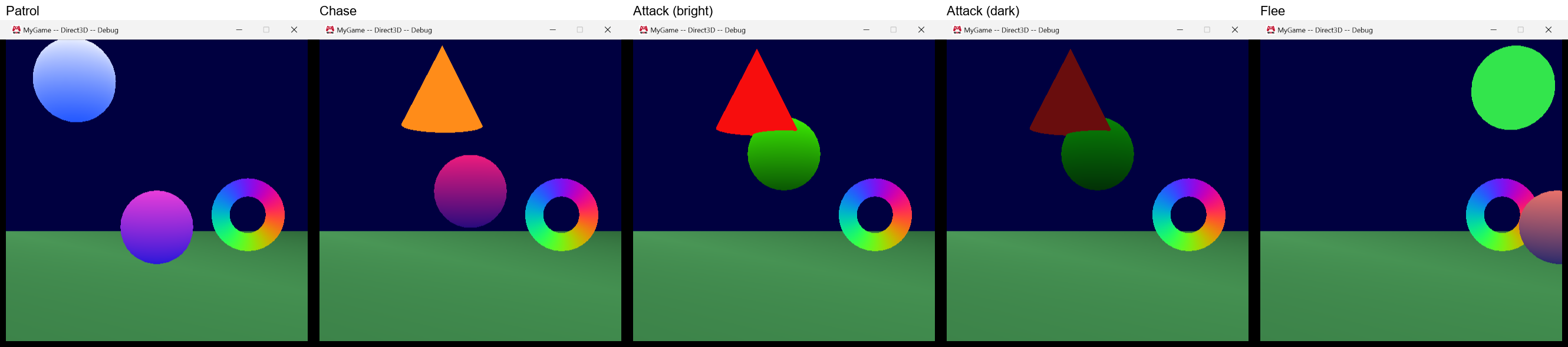
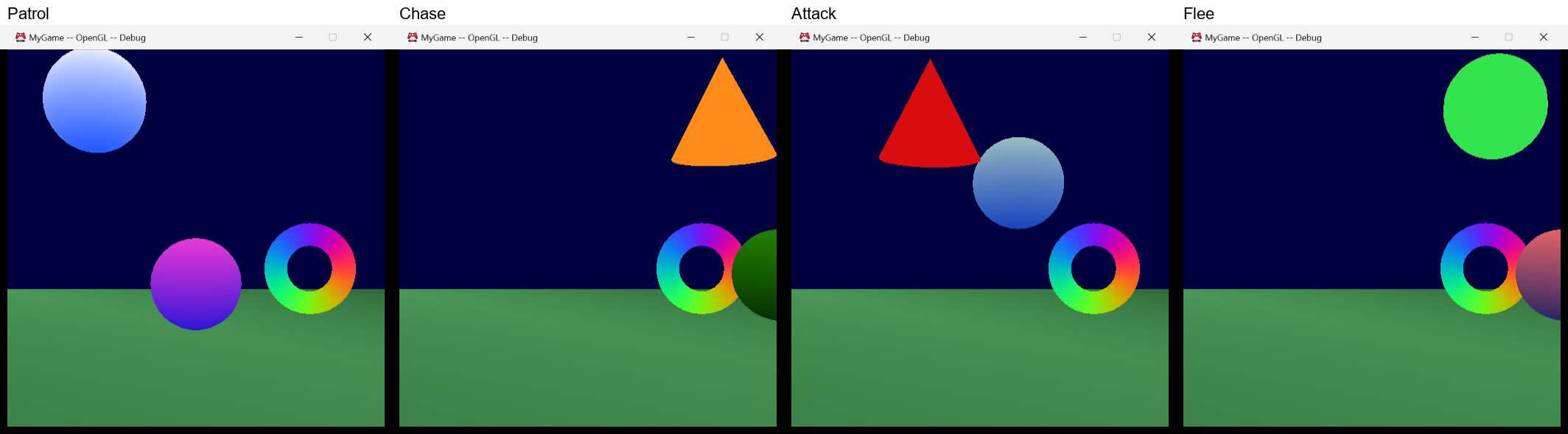
(These pictures are from Update #2. The guard hasn’t changed since then; the door was added to the left side of the scene for this write-up.)
The door (door.fsm) is the second example. It slides up when the player comes near it and closes again after the player has left. While it is closed, L locks it, and a locked door doesn’t open. It is deliberately different from the guard: it only has a bool and a trigger, two of its transitions have no conditions at all and just fire after one second, it uses exit callbacks, and its callbacks get the door itself as user data instead of the game.
From left to right: Closed (the box’s own wood colors), Opening (the animated color effect, half way up), Open (green), and Locked (red):
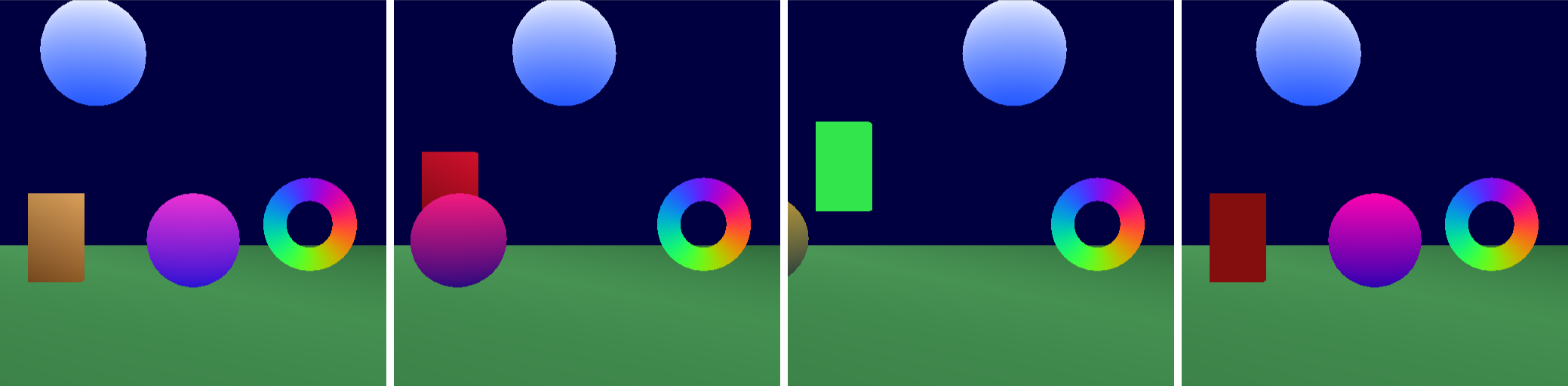
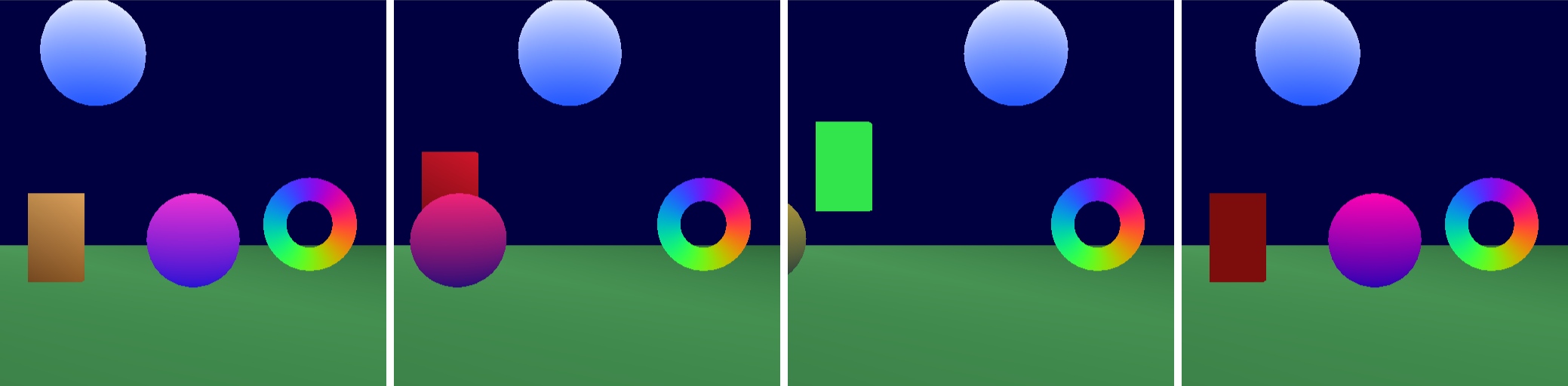
Every state change is written to Visual Studio’s Output window and to the log in Debug builds. This is the log of one run of the Direct3D Debug build. I pressed L twice (lock, unlock), hit the guard three times with H, and then walked left to the door. The lines “The player hit the guard” come from MyGame; all the others come from the library:
|
The OpenGL Debug build printed exactly the same lines for the same input.
2. What a classmate has to do to use it
In short (the details are in section 5 and in the README inside the ZIP):
- Copy two folders from the ZIP into their solution:
Engine\StateMachine(the run-time static library) andTools\StateMachineBuilder(the builder executable). - Add both projects to the solution, make their game reference
StateMachine, and make their asset build project depend onStateMachineBuilder. - Paste one
NewAssetTypeInfo( "stateMachines", ... )block intoAssetBuildFunctions.lua. - Put
.fsmfiles inContent\StateMachines\and list them understateMachinesinAssetsToBuild.lua. - In the game: load the definition, look up handles once, give each agent a
cStateMachine, set parameters and callUpdate()every simulation update.
No shared code has to change: nothing in Graphics, Application, the Assignment 01 code or the course’s asset build system, and the ZIP contains nothing from my game.
I tested these steps the way a classmate would. I made a separate worktree of my repository at the Assignment 08 commit (before any Engine System work), followed the README using only what is in the ZIP, added the guard and a minimal use to that game, and built all four configurations. It worked on the first try: all four configurations built without warnings, guard.fsm was built by the new builder, the guard changed state in both the Direct3D and the OpenGL build, and a replacement output function received the state change lines. A deliberate mistake (to = "Nowhere") failed the asset build with guard.fsm(33): error : Transition #1 of state "Patrol" goes to the state "Nowhere", which doesn't exist. The things I fixed came from reading the README before that test: it didn’t say that the ZIP has one top folder, and it didn’t have the timeSinceSawPlayer example that I promised in Update #2.
3. How I used what we learned this semester
The project requirements, and where each one is:
| Requirement | In my system |
|---|---|
| Its own static library | Engine/StateMachine (project StateMachine), namespace eae6320::AI. The builder is a separate tool project, Tools/StateMachineBuilder, built like MeshBuilder. |
| Intuitive interface | Two classes: cStateMachineDefinition (shared, loaded from a file) and cStateMachine (one per agent). Names are looked up once and turned into small typed handles. Callbacks are function pointers with a void*, like the rest of the engine. |
| Comments | Every public header starts with what the class is for, how to use it, and a short example. cStateMachine.h lists exactly what Update() does, in order. |
| Platform-independent interface, platform code in the implementation | The headers have no platform code. The only platform-specific file is Windows/DebugOutput.win.cpp (OutputDebugStringA). Direct3D and OpenGL builds behave identically, and the built files are byte-for-byte the same on every platform. |
| Human-readable format in Lua | .fsm files are Lua tables, validated by the builder with file and line numbers in the errors. |
| Builder to binary | StateMachineBuilder.exe writes .fsmbin files during the normal asset build. |
| Easy to load and use | One Load() call. The binary file is loaded as one block and used in place with no parsing. The definition is reference counted like cMesh and cEffect. |
The interface
The two classes split the data the same way meshes do: the definition is the shared asset, the state machine is the per-agent instance.
|
sStateHandle and sParameterHandle are two different structs around a uint16_t index, so passing a state where a parameter is expected doesn’t compile. Using a parameter with the wrong setter (SetBool() on a float) asserts in Debug builds.
Update() does the same thing in the same order every time:
- The first time only, it calls the initial state’s enter callback. (Not in
Initialize(), because no callbacks are registered yet at that point.) - It adds the elapsed time to the time in the current state.
- It checks the
anyStatetransitions, then the current state’s own transitions, each list in file order. The first one whose conditions are all true and whose minimum time has passed fires. At most one transition fires per update. - If one fired: the old state’s exit callback, the state change, the debug line, the new state’s enter callback.
- The current state’s update callback.
- All triggers are reset.
The format and the builder
A .fsm file returns a table with initialState, parameters, anyState and states. This is all of door.fsm without its comments:
|
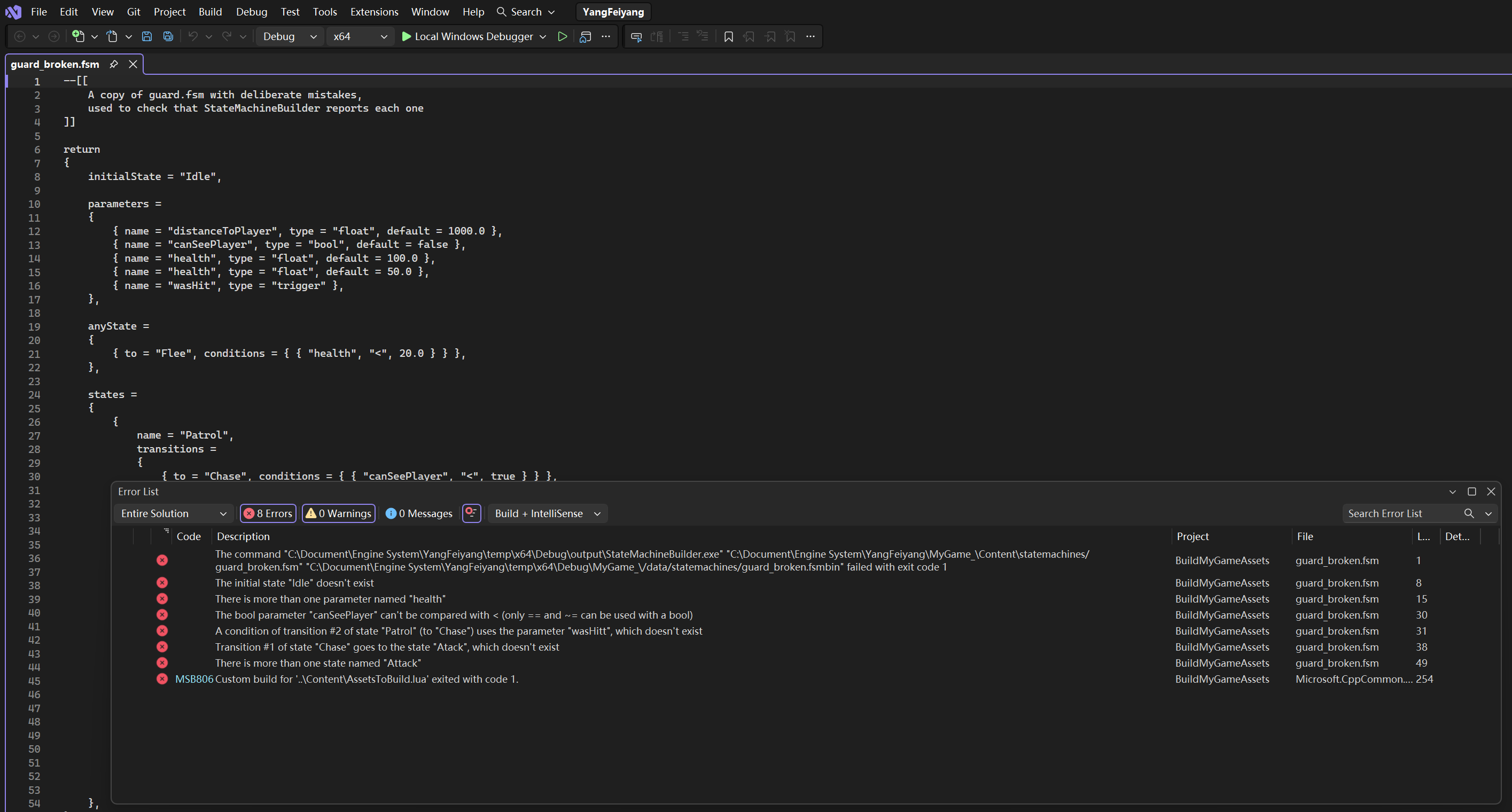
The builder checks everything a person can get wrong (a transition to a state that doesn’t exist, a condition on a parameter that doesn’t exist, < on a bool, a value compared with a trigger, duplicate names, a missing initial state, wrong types) and reports all errors at once in the file(line) : error : message format, so double-clicking one in Visual Studio’s Error List jumps to the line. Lua forgets which line a value came from, so for errors that aren’t Lua syntax errors the builder searches the source text for the name the error is about. This was the Error List for a test file with six mistakes in it (from Update #1):
The binary file
The built file is six parts, one after another:
| Part | Size | Contents |
|---|---|---|
| Header | 16 bytes | version, the four counts, initial state, number of “any state” transitions, name block size |
| Parameters | 8 bytes each | default value (float), name offset, type |
| States | 8 bytes each | first transition and count, name offset |
| Transitions | 12 bytes each | minimum time in state (float), target state, first condition and count |
| Conditions | 8 bytes each | value (float), parameter, comparison |
| Names | variable | null-terminated strings |
Everything refers to everything else by index. A state owns a range of the transition array, and a transition owns a range of the condition array. The “any state” transitions are simply the first ones in the transition array, so they need no list of their own. Bools and triggers are stored as 0.0f or 1.0f, so every condition is one float comparison at run time. Every struct is a multiple of 4 bytes with explicit padding, so all arrays start 4-byte aligned and are used in place. The structs live in one header, BinaryFormat.h, that the builder and the run time both include, with static_asserts on their sizes.
Loading is one Platform::LoadBinaryFile(), a check that the size matches the counts, pointer arithmetic to find each array, and one pass that checks every index is in range. After that the run time trusts the indices and never checks them again. guard.fsm builds into 269 bytes and door.fsm into 275.
This is what MyGame logs for the door when it loads it. It only uses the public interface, so it is also a round trip test from the Lua file through the builder and the loader back to the same description:
|
Other things from class that I used
- Reference counting with the engine’s macros, like
cMeshandcEffect. EachcStateMachineholds a reference to its definition while it is initialized. - The fixed-rate simulation update. The game sets parameters and calls
Update()inUpdateSimulationBasedOnTime(), so the AI runs at the simulation rate, and the time in state uses the simulation’s elapsed time. cResultand asserts for everything that can fail at load time, with a message in the log, so a bad file stops the game deliberately.- Configuration headers like the Asserts library:
Configuration.hturns the debug output on in Debug builds. - The asset build pipeline: a new asset type in
AssetBuildFunctions.lua, a builder that usesAssetBuildLibrary, and a build dependency so the builder exists before it runs.
4. What I learned and struggled with
Changing the file format early was cheap. In the proposal, states were a table keyed by name (states = { Patrol = { ... } }). When I wrote the builder I found that Lua silently keeps only the last of two equal keys, so duplicates could never be reported, and that Lua doesn’t keep key order, so state indices would depend on hash order. A list with a name field fixed both. It was one extra line per state, and nobody was using the format yet.
Line numbers for errors that aren’t Lua errors. I promised “file and line” in the proposal without thinking about how. Lua tables don’t remember source lines, so the builder keeps the source text and searches it for the line that contains the name the error is about. It is simple and works for every error I tried.
What minimumTimeInState really means. “Give up after 2 seconds without seeing the player” is not what minimumTimeInState = 2.0 says. It says “at least 2 seconds since entering Chase, and right now the player isn’t visible”. I decided to keep it simple and document it instead of adding per-condition timers. A game that needs the other meaning can keep its own timer and pass it in as a float parameter; the README shows how.
“Any state” transitions to the current state. The guard’s anyState transition goes to Flee when health < 20, and that stays true while it is fleeing. Without a rule it would exit and re-enter Flee every update. So an anyState transition that leads to the state the machine is already in is skipped. A state’s own transitions can still go to itself on purpose.
When the initial state is entered. At first the initial state’s enter callback ran in Initialize(), before any callbacks were registered, so the guard started with no mesh. Calling it in the first Update() made “initialize, register callbacks, update” just work.
The second example tested the parts the guard never used. The door uses transitions with no conditions, exit callbacks, and user data that is the agent instead of the game. All of it worked without changing the library, which was a relief, because those were the parts I had only tested in my head. The door is also where a trigger gets thrown away on purpose: L while the door is open sets toggleLock, no transition of the Open state checks it, and it is reset at the end of the update. That is the behavior I want, but it is easy to be surprised by, so it is in the README’s known limits.
Cleanup for other people. Reading my own headers as a newcomer, two things stood out. MyGame had its own copy of the code that turns a transition’s conditions into text, which the library also had (hidden inside the debug output). That code is now a public function, cStateMachineDefinition::DescribeConditions(), and both the debug output and MyGame use it. And the debug output could only go to the debugger and the log. Now a game can call DebugOutput::SetOutputFunction() once to send the lines anywhere, for example to an on-screen console, with the debugger and the log as the default. The function can be called in every configuration, so games don’t need #ifdefs.
Making the demo show every transition took longer than the library. The guard first never gave up chasing, because it always saw the player again before its two seconds were over; I made it slower than the player and tuned the sight radius. The guard was also behind the player at first, so in Attack the player covered the red cone. And the door was half off screen in the first screenshot.
Writing instructions is its own job. Following my own README in a clean copy of an older commit was the only real way to check it, because every step I skipped would have been obvious to me. In the end the steps held up, but the exercise changed how I wrote them: each step says exactly where a file goes and what to click, and the troubleshooting table lists the error you get when a step is missed, because those are the questions I expect to be asked.
What I would do differently or add in a real game: hierarchical states (a “Combat” state with sub-states), a way to see the current state of every agent on screen (the new output function is a start), and hot reloading .fsm files while the game runs, which would make tuning much faster.
Presentation video: https://fffeiya.github.io/game-essay/engine-system-presentation/
5. Download and installation
EngineSystem_StateMachine.zip contains:
|
The library uses only engine projects that everybody has (Asserts, Logging, Platform, Results, Windows). The builder uses Asserts, Platform, Windows, Lua and AssetBuildLibrary.
1. Copy the folders so that you have <solution>\Engine\StateMachine\StateMachine.vcxproj and <solution>\Tools\StateMachineBuilder\StateMachineBuilder.vcxproj. The project files use relative paths, so the folders must be exactly there.
2. Add both projects to the solution (right-click the Engine / Tools solution folder > Add > Existing Project…). They already have all four configurations.
3. Dependencies:
- your game project > Add > Reference… > check StateMachine;
- your asset build project (e.g. BuildMyGameAssets) > Build Dependencies > Project Dependencies… > check StateMachineBuilder (like you did for MeshBuilder).
4. Tools\AssetBuildLibrary\AssetBuildFunctions.lua: add this after the meshes asset type:
|
5. Your game’s Content\AssetsToBuild.lua: put your files in Content\StateMachines\ and list them:
|
The built file is data/statemachines/guard.fsmbin (the asset build writes lower-case paths).
6. Build. A mistake in a .fsm file fails the asset build with the file and line.
Nothing else in your solution has to change.
6. Using it in your game
These snippets are from my cMyGame.cpp. Include <Engine/StateMachine/cStateMachine.h> in your game’s header.
Members: one definition per .fsm file, one cStateMachine per agent, and the handles you need:
|
Load the definition and look up handles in Initialize(). A misspelled name returns an invalid handle (and asserts), so check them:
|
Give the agent its state machine and register callbacks. { onEnter, onUpdate, onExit }, any of them can be nullptr, and the last argument is passed to every callback as i_userData:
|
A callback casts the user data back:
|
Every simulation update, in UpdateSimulationBasedOnTime(), set the parameters and then call Update():
|
Ask about the state when you need it, instead of (or as well as) using callbacks:
|
Clean up in CleanUp(): the state machine releases its reference to the definition, and the game releases the one Load() gave it:
|
Send the debug lines somewhere else (optional), once in Initialize(). Passing nullptr goes back to the debugger and the log:
|
The README in the ZIP also covers the full .fsm reference, how to read the debug output, the known limits (no nested states, one transition per update, conditions are only ANDed, triggers last one update) and a troubleshooting table.
Build and test
- All four configurations (Debug/Release, x64 Direct3D / x86 OpenGL) build with 0 errors and 0 warnings from a clean
tempfolder. - The Debug builds of both platforms print the same state changes for the same input (the log in section 1).
- The two ZIPs contain only the files listed above: no game code from MyGame, no meshes or effects from Graphics, no logs.
Time spent on the whole project: 8 hours