GAMES 6320 · Assignment 08
Binary mesh files built by MeshBuilder
MeshBuilder now writes binary mesh files, and the game loads them with four extractions and no parsing.
Course: GAMES 6320-001 — Game Engineering II (Fall 2026)
Download (one click, ZIP): MyGame_Assignment08_Release_x64.zip
The ZIP contains a Direct3D Release build (
x64). Unzip it and runMyGame.exe.Controls:
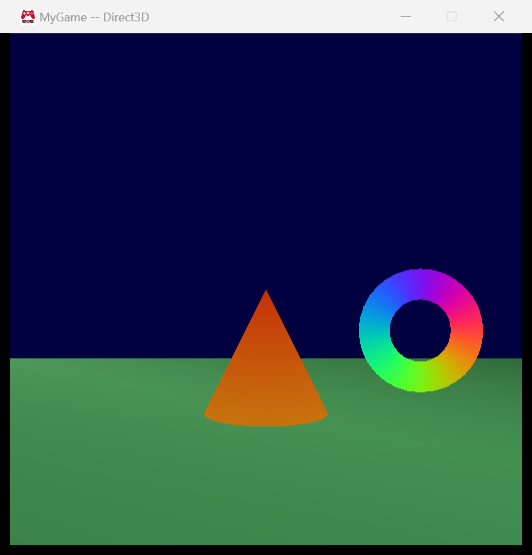
Key What it does Arrow keys Move the sphere left / right / up / down Space(hold)The sphere becomes a cone A/DMove the camera left / right W/SMove the camera forward / back EscExit
1. What the assignment was about
For the last two assignments my meshes were stored as Lua files: easy for a person to read, easy
for Maya to write, and easy to diff in git. But the game read those files the same way, which
means that every time it started it ran a Lua interpreter over half a megabyte of text for a
sphere and converted every number from text to a float.
This assignment separates the two jobs. The human-readable file stays the source asset, and
the asset build turns it into a binary file that is exactly the bytes the GPU wants:
- MeshBuilder (a tool that runs at build time) now does all of the Lua reading. It writes the
vertex count, the index count, the vertex array and the index array straight from memory to the
built file: four writes, no loops. - The game loads the built file into memory with one call and finds the four pieces in it with
a little pointer arithmetic. There is no parsing and not a single loop in the mesh loading code.
All the slow, forgiving work (parsing, validation, helpful error messages, converting the winding
order) happens once on my machine during the build. The game only does the fast part.
I also did the small optional challenge of giving built meshes their own extension: source files are
still .mesh, built files are .meshbin, so it is obvious which kind of file you are looking at.
2. Screenshots of the game
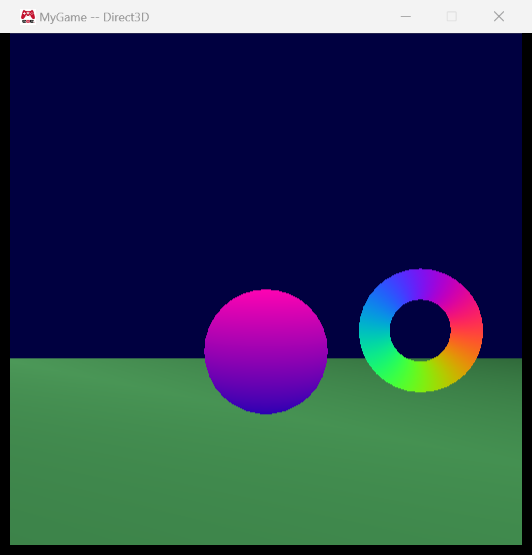
The game looks exactly like it did last week, which is the point: only the file format changed.
Holding Space turns the sphere into the cone:
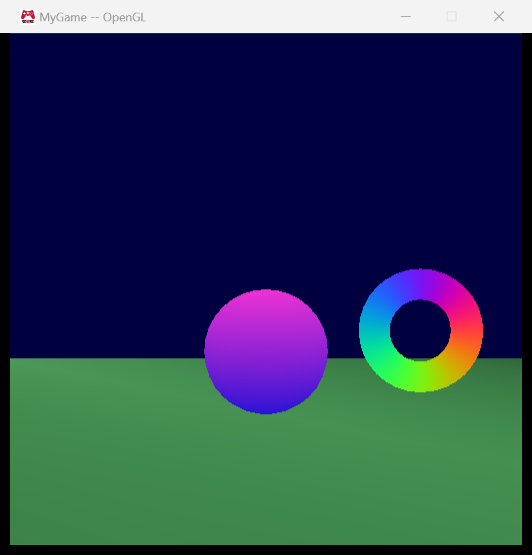
The OpenGL build renders the same scene (the sphere’s color is animated over time, which is why
its shade is a little different in each screenshot):
3. A built binary mesh file
The easiest mesh to explain is the floor: a plane with 4 vertices and 2 triangles (6 indices).
This is a hex view of the built file data/meshes/floor.meshbin from the Direct3D build, with
the four parts outlined in different colors:
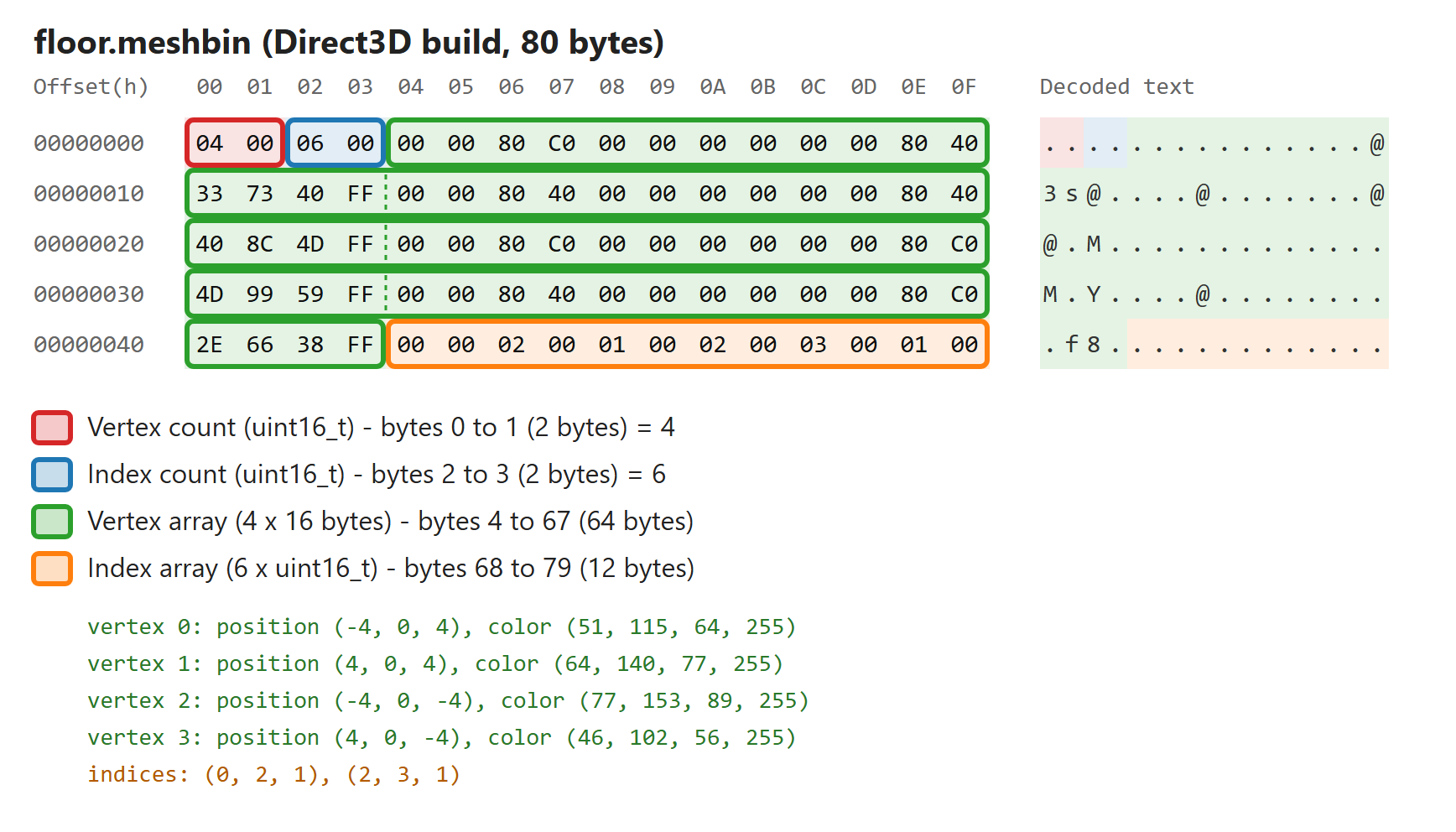
How to read it (all numbers are little-endian, so the low byte comes first):
- Red, bytes 0–1:
04 00= 4, the number of vertices (uint16_t). - Blue, bytes 2–3:
06 00= 6, the number of indices (uint16_t). - Green, bytes 4–67: the 4 vertices, 16 bytes each (the dashed lines mark where one
vertex ends and the next begins). Each vertex is threefloats for the position followed by four
bytes of color. For example the first vertex is00 00 80 C0= −4.0,00 00 00 00= 0.0,00 00 80 40= 4.0, then33 73 40 FF= the color (51, 115, 64, 255), a dark green. - Orange, bytes 68–79: the 6 indices (
uint16_t): 0, 2, 1 and 2, 3, 1.
The whole file is 2 + 2 + 4 × 16 + 6 × 2 = 80 bytes. The human-readable floor.mesh that it
was built from is 1,599 bytes.
The order, and why
I chose: vertex count, index count, vertex array, index array.
- The counts have to come before the arrays. To find the index array the game has to know how
big the vertex array is, and that needs the vertex count. Putting a count after its array would
be one of the wrong orders: the game couldn’t find it without already knowing it. - Both counts first makes a tiny fixed-size header. The first 4 bytes are always the two
counts, so the game reads them and can check right away that the file is exactly4 + 16 × vertexCount + 2 × indexCountbytes long, before it looks at any of the array data.
A truncated or corrupt file is caught with a single comparison. - Everything ends up naturally aligned, for free. The loaded file starts at an address from
malloc(), which is aligned for anything. The vertex array starts at offset 4, which is a
multiple of 4 (whatfloats need), and the index array starts at4 + 16 × vertexCount, which
is even (whatuint16_ts need). With the other “count, array, count, array” order the vertex
array would start at offset 2, which is not a multiple of 4. On x86 that still works, but it
isn’t how the data is supposed to be laid out. I didn’t need any padding to get this.
4. Why binary files?
The two big advantages:
- They are much smaller. A
floatis always 4 bytes in binary, while in text “-0.4045085”
is 10 characters plus a name, an=sign, a comma and spaces. On top of that, the built file
only has the data the engine actually uses, while the source file also keeps normals, tangents and
texture coordinates for the future. Less data means less to read from disk (or download). - They are much faster to load. The bytes in the file are already in the exact layout the
engine and the GPU use. Loading is “read the file into memory, point at the right places”. There
is no tokenizing, no Lua tables, no text-to-number conversion and no per-vertex work at all.
(A third, smaller one: the game doesn’t need a parser, so the Lua library and all the error handling
for badly written files aren’t needed for meshes at run time any more.)
5. Binary vs. human-readable
| Human-readable (Lua) | Binary | |
|---|---|---|
| Size | Large | Small |
| Load speed | Slow (parse everything) | Fast (no parsing) |
| Can a person read or fix it? | Yes, in any text editor | Only with a hex editor and the layout in mind |
| Useful diffs and merges in git | Yes, line by line | No, git sees “binary file changed” |
| Good error messages | Yes (file and line number) | No, a bad byte is just a wrong number |
| Survives engine changes | Yes, it’s independent of how the engine stores data | No, it must match the engine exactly |
| Can differ per platform | No need | Yes, can be tuned for each platform |
That is why we use both, each where its advantages matter:
- Source control stores the human-readable files. That’s where people work with the data:
reviewing changes, merging two people’s edits, fixing something by hand, finding out why a model
looks wrong. Those files are also the real source of truth: if I change the binary format next
week (say, add normals or 32-bit indices), I just rebuild, and every mesh comes out in the new
format. If only binary files were stored, changing the format would mean converting every one of
them by hand, or losing them. - The game uses binary files. The player never reads a mesh file, so readability is worth
nothing at run time, while size and speed matter every time the game starts. The binary files
are generated from the source files, so they don’t belong in source control at all (like.objor.exefiles); they are rebuilt whenever they’re needed.
The asset build is the bridge: it is the one place that pays the price of parsing, and it pays it
on the developer’s machine, once, instead of on every player’s machine, every time.
6. Are the built files the same for Direct3D and OpenGL?
No. They differ in exactly one way: the order of the indices inside each triangle.
Here is the OpenGL build of the same floor:
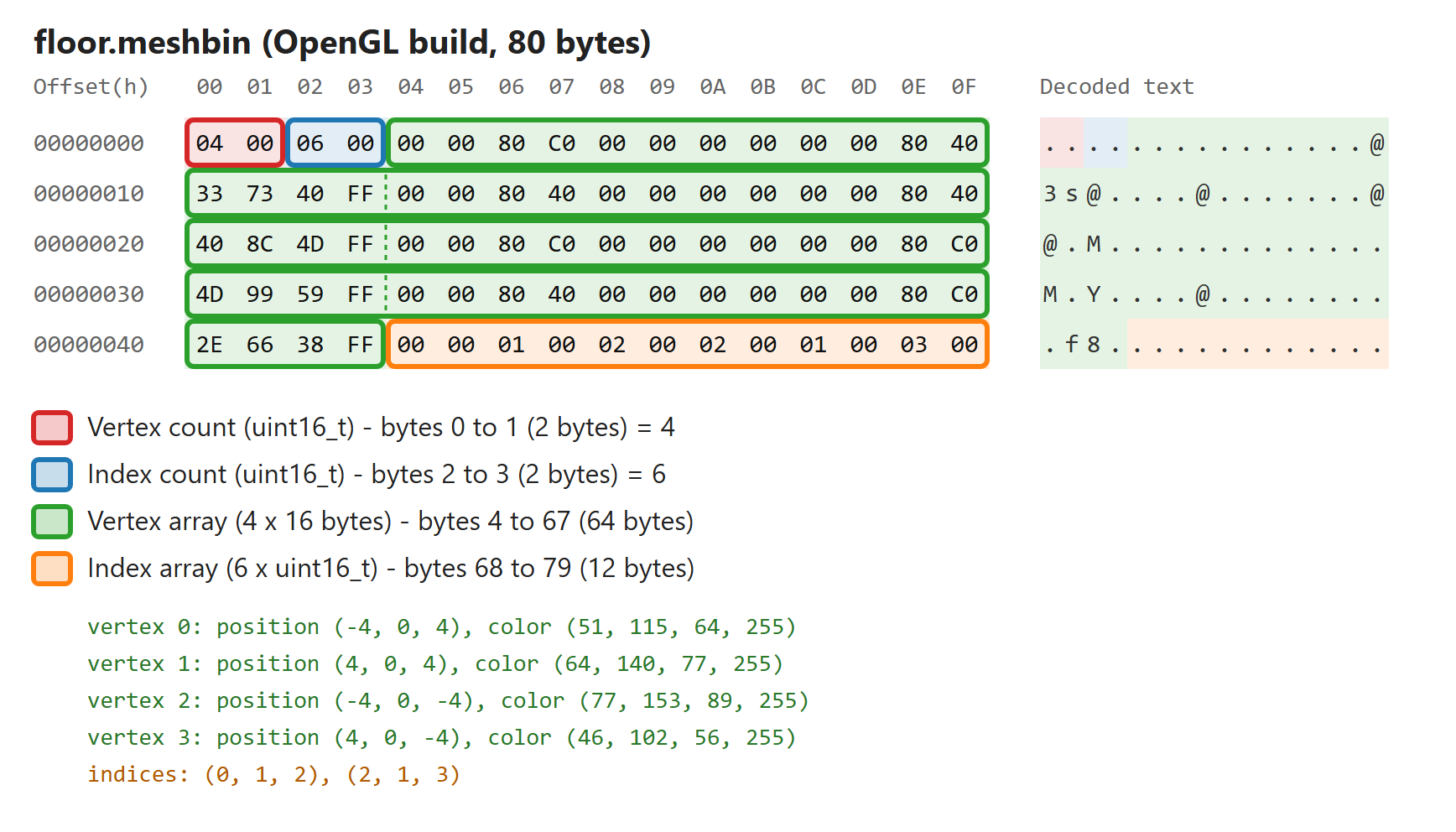
The first 68 bytes (the counts and all four vertices) are identical. Only the orange index array
is different:
| Triangle 1 | Triangle 2 | |
|---|---|---|
| Direct3D build | 0, 2, 1 | 2, 3, 1 |
| OpenGL build | 0, 1, 2 | 2, 1, 3 |
The human-readable file lists every triangle counter-clockwise (right-handed), which is what
OpenGL expects of a front face, and is also what Maya uses. Direct3D expects front faces to be
clockwise (left-handed). Until now the game swapped the second and third index of every
triangle at run time on Direct3D. That was a loop over every triangle, and this assignment doesn’t
allow any loops in the loading code. More importantly, it was work the game repeated every time
it started, although the answer is always the same. So MeshBuilder now does the swap when it builds
the Direct3D version, and the game hands the indices to the GPU as they are:
|
MeshBuilder is compiled once per platform (x64 is Direct3D and x86 is OpenGL in my solution),
so the #if picks the right behavior for the game it builds assets for.
Everything else is identical on purpose. The vertex layout (sVertex_mesh: 3 floats + 4uint8_ts = 16 bytes) is the same on both platforms, both run on little-endian x86 CPUs, and I
always write the counts and indices with explicit sizes (uint16_t) rather than int or size_t,
whose sizes depend on the platform. This is also why the binary files are a build product: it is
normal for built assets to be platform-specific (my shaders already are), while the source asset
is shared.
7. Extracting the four pieces at run time
The game loads the whole file with Platform::LoadBinaryFile() and then extracts the four pieces.
This is the actual function (with its two error checks kept, because they show the idea of the
header nicely):
|
Four extractions, no loops. The counts are copied out with memcpy() (the standards-compliant way
to read a value from an arbitrary address), and the two arrays aren’t copied at all: the mesh data
just points into the loaded file. That memory only has to live until the vertex and index buffers
have been created on the GPU, which happens inside cMesh::Load() while the file data is still in
scope.
For comparison, the writing side in MeshBuilder is the mirror image, four writes of whole blocks:
|
How MeshBuilder is organized
MeshBuilder is built around those four pieces of data. One self-contained part takes the path of
the Lua file and produces a std::vector of vertices and a std::vector of indices; that is
essentially last week’s loader moved out of the game. Then the Direct3D winding swap, and then a
function that writes the four pieces and doesn’t care where they came from. If I ever want to read
a different source format, only the first part changes.
The error handling changed along with the move. In the game, errors went to the log file; in
MeshBuilder they go through OutputErrorMessageWithFileInfo(), which formats them the way Visual
Studio expects, so they show up in the Error List and double-clicking one opens the mesh file.
Typing sdf into floor.mesh now fails the build with:
|
The engine’s Lua library already puts the line number into its messages, so MeshBuilder picks it
out and passes it on as the line number. Visual Studio then jumps straight to line 10. Other problems are
reported the same way (with the file), for example “Triangle 3 refers to a vertex that doesn’t
exist (every index must be an integer from 0 to 3)” or “The mesh has 70000 vertices, but a mesh
can’t have more than 65535”.
That last limit changed slightly: last week a mesh could have 65,536 vertices (every value auint16_t index can hold). Now the count is also a uint16_t, and it can only go up to 65,535,
so that is the new maximum, for vertices and for indices.
8. Measuring the difference with a big helix
To see the advantages with real numbers I made a helix in Maya: 5 coils, 109 subdivisions per
coil and 20 sides. That gives 21,836 triangles = 65,508 indices, which is as close to the
65,535 limit of a uint16_t index count as I could get with a helix (the triangle count has to
be even, and it depends on the coil and side counts). I exported it with my exporter from last week. It
turned out the exporter makes one vertex for every triangle corner on this shape, so it also has
65,508 vertices. Both counts are just under their limit. I didn’t commit the helix; it was only
in the project for the measurements.
All timings were done on a Release build (x64, Direct3D) with the Time functions, in
milliseconds, and repeated five times:
- Human-readable: timing code in MeshBuilder, from just before the Lua file is loaded until
just before the binary file is written (loading, running and reading every vertex and triangle
out of the Lua tables). - Binary: timing code in
cMesh::Load(), from just beforeLoadBinaryFile()until the four
pieces have been extracted, written to the log file. I startedMyGame.exedirectly from its
folder (not from Visual Studio), so no debugger was attached.
The timing code was temporary and has been removed again.
Size on disk
| File | Size |
|---|---|
helix.mesh (human-readable) |
23,960,033 bytes (about 24 MB) |
helix.meshbin (binary) |
1,179,148 bytes (about 1.2 MB) |
The binary file is exactly 4 + 65,508 × 16 + 65,508 × 2 = 1,179,148 bytes, as predicted, and it is
about 20 times smaller. The human-readable file needs about 366 bytes per vertex; the binary one
needs 18 (16 for the vertex and 2 for its index).
Load time
| Run | Human-readable (MeshBuilder) | Binary (game) |
|---|---|---|
| 1 | 427.8 ms | 0.476 ms |
| 2 | 420.8 ms | 0.496 ms |
| 3 | 446.1 ms | 0.469 ms |
| 4 | 448.8 ms | 0.487 ms |
| 5 | 454.5 ms | 0.550 ms |
| Median | 446.1 ms | 0.487 ms |
Loading the binary file is about 900 times faster.
What the numbers mean
The size difference shows up in the zipped game (smaller download), on disk and in how much data has
to be read when the game starts. It’s 20× here partly because text is bulky and partly because the
source file keeps data the engine doesn’t use yet. Both are fine for a source file and a waste for
the game.
The speed difference is much larger than the size difference, and that is the interesting part: the
binary file is not 900 times faster because it is smaller. It is faster because there is no work to
do. Reading 1.2 MB into memory is close to free on a modern PC; what took almost half a second
for the Lua file was running it, building tables for 65,508 vertices and 21,836 triangles, and
looking up and converting every value one by one. The binary version does none of that. It costs
two memcpy()s of two bytes each and some pointer arithmetic, no matter how big the mesh is.
To put half a second into perspective: a game running at 60 frames per second has about 16.7 ms per
frame. Parsing this one helix at load time would take as long as about 27 frames, while loading the
binary file fits into a frame 34 times over. A real level has hundreds of meshes, and loading
screens (or streaming meshes in while the player moves through the world) are exactly where this
matters. And all of that cost is now paid once, by the asset build on my machine, instead of every
time the game starts on every player’s machine.
(Both measurements were taken with the file already in the operating system’s file cache, because
it had just been built or loaded. A cold read from a disk would add time to both, more to the 24 MB
file than to the 1.2 MB one.)
9. Build / test
All four configurations (Debug/Release × x64/x86) build from scratch without errors or
warnings, and both platforms render the same scene. Building only the game project and running it
shows the “Initialization failed” message and exits; after building only BuildMyGameAssets the
game runs. Adding a typo like sdf to a mesh file makes the asset build fail with the error in the
Error List, as shown above.
10. Reflection
The nicest part was how little the game’s code became. cMesh::Load() used to contain a whole Lua
reader with seven helper functions; now it is “load the file, extract four things, create the
buffers”. Because the reader was written as a separate piece last week (path in, vertices and
indices out), moving it into MeshBuilder was mostly a matter of changing where errors are reported.
The decision I thought about most was the winding order. Converting at build time makes the
Direct3D and OpenGL files different. At first I didn’t like that, because one file for both
platforms is simpler. But the game was redoing the same conversion on every start, and shaders are
already built per platform. Once I thought of the built files as “data prepared for one specific
platform”, having them differ made sense.
Something I hadn’t expected: my first attempt at turning Lua’s error messages into Visual Studio
errors didn’t find the line number at all, because the engine’s Lua library formats its messages
as file(line) : error: instead of the usual file:line:. Testing the sdf case in a real build,
instead of assuming it worked, is what caught it.
The helix measurement also changed how I think about “loading”. I had expected binary to be faster
mostly because the file is smaller, but the size only explains a factor of 20. The other factor of
about 45 is simply not doing work.
What I would do next, or in a real game:
- Add the data the engine will need soon (normals for lighting, texture coordinates) to the binary
vertex format. The source files already contain it, so it’s just a rebuild. - Support 32-bit indices for meshes that need them, while still using 16-bit indices for
everything else, since most meshes are small. - Add a small header with a version number (and maybe a magic number) to the binary file, so that
the game could recognize a file from an older build instead of misreading it. With the asset build
always rebuilding everything this hasn’t been a problem yet, but it would be in a game that patches
files.