GAMES 6320 · Engine System · Update #2
Engine System update: the state machine run time, debug output and a guard demo
Each agent now owns a small state machine that checks transitions once per simulation update and calls enter, update and exit callbacks. A guard in MyGame patrols, chases, attacks and flees, and every state change is logged.
Course: GAMES 6320-001 Game Engineering II (Fall 2026)
1. Where the system stands
My engine system is a finite state machine library for game AI. The states of an enemy, the transitions between them and the conditions for each transition are written in a human-readable .fsm file. A builder turns that file into a binary file, and at run time the game only sets parameters (like the distance to the player) and reacts to the state the machine is in.
This is the schedule from the proposal, updated:
| Date | Milestone | Status |
|---|---|---|
| Update #1 (Nov 3) | File format final, builder working with validation, binary file loading into cStateMachineDefinition |
Done |
| Update #2 (Nov 10) | cStateMachine run time with callbacks and debug output; demo enemy in MyGame |
Done |
| Write-up (Nov 19) | Cleanup, README, a second example machine, support for classmates | Not started |
What was added since Update #1:
cStateMachine(namespaceeae6320::AI), the per-agent run time: current state, time in state, parameter values,Update()and enter / update / exit callbacks.- Debug output of every state change. This is the library’s only platform-specific code, in
Windows/DebugOutput.win.cpp. - A guard in MyGame that is driven by
guard.fsm: it patrols, chases the player, attacks, and flees when it has been hit too often. It looks different in every state. - All four configurations (Debug/Release, x64/x86) still build without warnings, and the Direct3D and OpenGL builds behave the same.
2. The cStateMachine interface
A cStateMachineDefinition is the shared, read-only part (one per .fsm file). A cStateMachine is the small part that every agent owns. This is the main part of the public header, Engine/StateMachine/cStateMachine.h:
|
There are getters for the parameters too (GetFloat(), GetBool(), IsTriggerSet()). Every setter and getter checks the parameter’s type in the definition and asserts in Debug builds if it is wrong, so SetBool() on the health float stops right there instead of silently doing nothing.
The callbacks are plain function pointers with a void* for the game’s own data. I thought about std::function, but a function pointer plus user data is what the rest of the engine uses, it can’t allocate, and it is easy to explain to someone who uses the library.
What Update() does
Update() is meant to be called once per simulation update, after the game has set the parameters. In this order it:
- calls the initial state’s enter callback, but only the first time it is called;
- adds the elapsed time to the time in the current state;
- looks for a transition to fire: first the “any state” transitions, then the current state’s own transitions, each list in the order of the
.fsmfile. The first one whose conditions are all true, and whoseminimumTimeInStatehas passed, fires. At most one transition fires per update, so a chain like Patrol to Chase to Attack takes two updates, and every state gets at least one update callback; - if a transition fired: calls the old state’s exit callback, changes the state, resets the time in state to zero, and calls the new state’s enter callback;
- calls the current state’s update callback (so a state that was just entered is also updated in the same tick);
- resets all triggers to false.
Because triggers are reset at the end of Update(), a trigger that the game sets is seen by exactly one round of transition checks. If no transition uses it in that update, it is gone, which is what I want for a one-shot event like “was hit”.
The conditions are compared as floats. Bools and triggers are stored as 0 or 1 (like in the binary file), so the check is one switch on the comparison with no special cases per type.
3. Debug output
Every time a transition fires the library writes one line:
|
The text is built in DebugOutput.cpp, which is platform-independent and reuses the same wording as the .fsm file. Writing it to the debugger is the only platform-specific part. It is declared in DebugOutput.h and implemented in Windows/DebugOutput.win.cpp:
|
I followed the pattern of the Asserts library: a Configuration.h defines EAE6320_AI_SHOULDOUTPUTSTATECHANGES only in Debug builds, and everything in the debug output files is inside #ifdef of it. A game that wants to see the state changes in a Release build can define it there. The same line also goes to the engine’s log file, which is where the lines below come from.
This is the log of one run of the Direct3D Debug build (the OpenGL Debug build printed exactly the same lines). I moved the player up to the guard, ran away to the right until the guard gave up, and then pressed H three times:
|
The lines starting with “The player hit the guard” come from MyGame, not from the library. The Release build of the same run writes only those three lines.
4. The demo
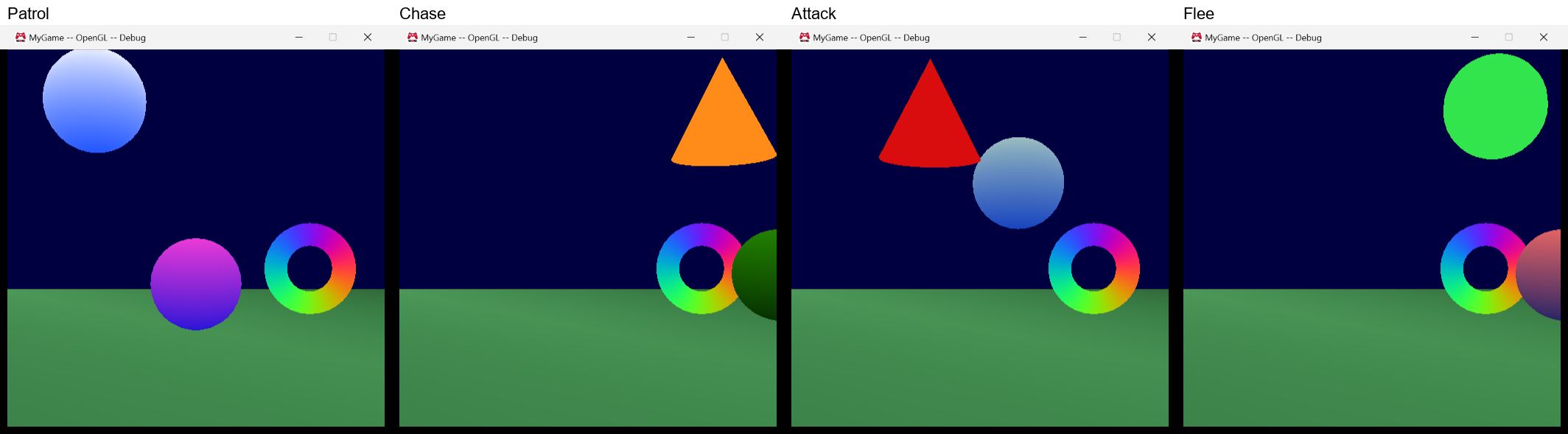
The guard walks back and forth above the player. The player moves with the arrow keys, and H hits the guard. The guard’s mesh and color show its state:
| State | Looks like | Moves |
|---|---|---|
| Patrol | white/blue sphere | between two points |
| Chase | orange cone | towards the player, slower than the player |
| Attack | red cone that pulses twice per second | stands still |
| Flee | green sphere | away from the player, but stays on screen |
The colors are three small new fragment shaders. The “attack” one makes the red pulse with the simulation time, which is my stand-in for an attack animation. These are the states in the Direct3D build (the two Attack pictures are the same state half a pulse apart):
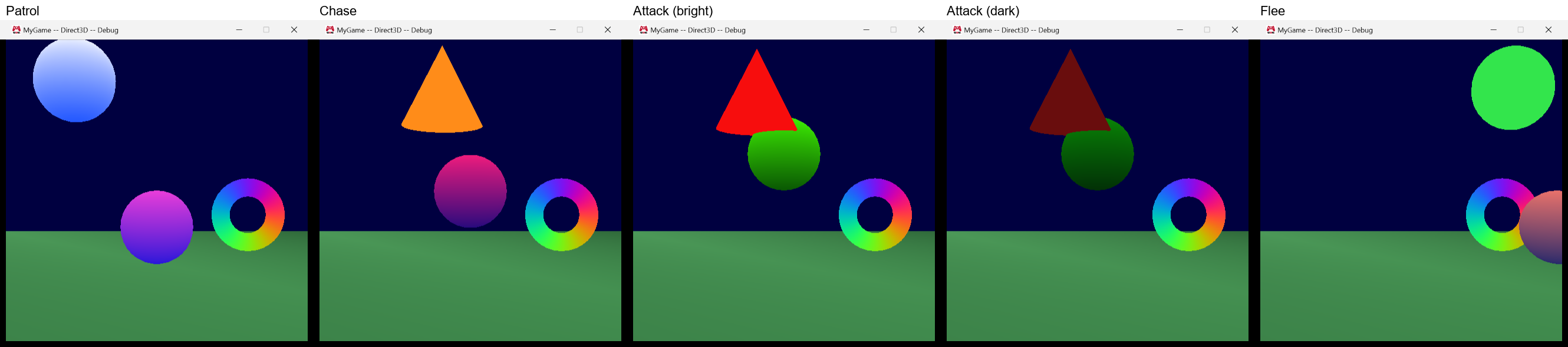
And in the OpenGL build:
Setting it up
In cMyGame::Initialize(), after the definition is loaded and the handles are looked up, the guard gets its own state machine and the callbacks:
|
The callbacks are static member functions of cMyGame, so the void* is the game and they can use its meshes and effects. An enter callback changes the look, and an update callback sets the velocity:
|
Every simulation update
In UpdateSimulationBasedOnTime() (the fixed-rate update) the game sets the parameters and then updates the state machine. The guard’s movement for this tick comes out of the update callback:
|
The H key is read in UpdateSimulationBasedOnInput(), and only the moment it goes down counts as a hit, so holding it doesn’t hit the guard every tick.
The guard is a little in front of the plane the player moves in, so that the two meshes never go through each other. Because of that the distance is measured in the XY plane only.
Changes to guard.fsm
The numbers in guard.fsm from Update #1 were guesses. With the real scene they didn’t work: an attack distance of 2 is most of the screen. I changed the attack distance to 1.1, the “back to Chase” distance to 1.4, and the give-up time from 3 to 2 seconds. The structure of the file is the same. Only the data changed, and I didn’t have to touch any code for it, which is the point of the system.
5. Decisions
When the initial state is entered. The initial state’s enter callback is called in the first Update(), not in Initialize(). In Initialize() no callbacks can be registered yet, so the guard would never get its “enter Patrol” call and would have no mesh. Calling it in the first update means the order “initialize, register callbacks, update” just works.
An “any state” transition to the state the machine is already in is skipped. The guard’s anyState transition goes to Flee when health < 20. That stays true after the guard has started fleeing, so without a rule it would exit and re-enter Flee in every update, and the enter and exit callbacks would run in every simulation update. I decided that these transitions are skipped, and the next transitions in the list are still checked. A state’s own transitions are not affected, so a state can still have a transition to itself on purpose (for example to restart its timer).
minimumTimeInState stays as it is. In Update #1 I noticed that “give up after 3 seconds without seeing the player” is not what minimumTimeInState = 3.0 means. It means “at least 3 seconds since entering Chase, and right now the player isn’t visible”. I decided to keep it and document it instead of adding a “condition true for N seconds” option. In the demo it behaves well enough: the guard gives up 2 seconds after it started chasing if it can’t see the player at that moment. Doing it properly needs a timer per condition per agent, which makes the run time and the file format more complicated for one feature. A game that needs it can already do it with a float parameter, for example timeSinceSawPlayer, and a condition { "timeSinceSawPlayer", ">", 3.0 }. I will put that example in the README.
Initialize() takes a non-const reference. I wanted const cStateMachineDefinition&, because the state machine never changes the definition. But the reference count is changed through IncrementReferenceCount(), which isn’t const in the engine’s macro. Instead of a const_cast the parameter is non-const, and the comment says why.
Wrong parameter types. In Debug builds SetFloat() on a bool asserts. In Release builds the call is ignored and nothing is written. I preferred this over writing the value anyway, because a float written into a bool parameter would make the conditions compare against values other than 0 and 1.
What was hard
- Making the demo show every transition in one run took more tuning than writing the library. The first runs never got back to Patrol, because the guard always saw the player again before its 2 seconds in Chase were over. I made the guard slower than the player and tuned the sight radius until running away really works.
- In the first version the guard was behind the player, and in Attack the player’s sphere covered the red cone, so the most important state was the hardest to see. Moving the guard in front fixed it.
- Deciding the order inside
Update(). I went back and forth on whether the update callback should run before or after the transition check. After is better: the game then always updates the state that the machine is really in at the end of the tick, and a new state starts moving in the same tick it was entered.
6. What is left for the final week (Nov 19)
- README for classmates: the
.fsmformat, how to add the builder and the library to their solution (asset type inAssetBuildFunctions.lua, build dependency, library reference), and the API with a short complete example, including thetimeSinceSawPlayerpattern from above. - A second example machine that uses the system differently from the guard, probably a door or turret with only bools and triggers, so that the README doesn’t only show one use.
- Cleanup: MyGame still has its own copy of the code that describes conditions as text for the definition log. The library now has the same code for the debug output, so the game should use the library’s version. I also want to look at the public header once more from the point of view of someone who hasn’t seen it.
- Helping classmates who want to use the system, and fixing what they run into.
- Stretch goal: let a game choose its own output function for the state changes (for example to show them on screen), with the debugger as the default. I think this is realistic because the output already goes through one function.
Time spent since Update #1: 5 hours