GAMES 6320 · Engine System · Proposal
Engine System proposal: data-driven AI state machines
A static library for finite state machines in game AI: states, transitions and conditions in Lua, a builder that makes binary files, and a small run-time API.
Course: GAMES 6320-001 — Game Engineering II (Fall 2026)
What it is
My engine system is a finite state machine (FSM) library for game AI.
Most enemies and NPCs in small games end up as a hand-written switch on an enum:
- the guard is patrolling,
- it sees the player and starts chasing,
- it gets close enough and attacks,
- it loses the player and goes back.
The logic for when to switch states gets mixed into the code for what to do in each state. Every change means recompiling and hunting through if statements.
With my system, the shape of the behavior lives in a data file:
- which states exist;
- which transitions connect them;
- what conditions trigger each transition.
The game code only does two things:
- It tells the state machine what the agent currently knows (distance to the player, can it see the player, how much health it has).
- It says what to do while the agent is in a given state.
A designer (or you, wearing your designer hat) can then tune or add behavior in the Lua file and rebuild the assets without touching C++.
I have written enemy AI like this by hand several times: in the AI for Games class and for the Martyr enemy in our studio game in Unreal. Every time, the transition logic was the part that got messy. That is the part I want to take out of the code.
Features
- States and transitions written in Lua, in a human-readable
.fsmfile that follows the same rules as our.meshfiles. - Named parameters. A machine declares float, bool and trigger parameters with default values. The game sets them each frame, for example
distanceToPlayer,canSeePlayer, or a one-shotwasHittrigger. - Conditions on transitions.
- Comparisons of a parameter with a constant:
<,<=,>,>=,==,~=. - Several conditions on one transition all have to be true.
- A transition can also require a minimum time in the current state, e.g. “give up the chase after 3 seconds without seeing the player”.
- Comparisons of a parameter with a constant:
- Transition priority. Transitions are checked in the order they are written, and the first one that passes wins. The result is deterministic and easy to reason about.
- “Any state” transitions. These are checked from every state, for things like “health below 20 → Flee” or “wasHit → Stagger”, so the same transition doesn’t have to be copied into every state.
- Enter / update / exit callbacks. The game registers functions per state, and the library calls them at the right time.
- One definition, many agents. The built data (
cStateMachineDefinition) is loaded once and shared, reference-counted likecMeshandcEffect. Each agent owns a smallcStateMachineinstance with its current state, timer and parameter values. - Build-time validation. The builder reports mistakes in the Visual Studio Error List, with the file and line where possible:
- a transition to a state that doesn’t exist;
- an unknown parameter name;
- comparing a bool with
<; - a missing initial state;
- duplicate names.
- Debug output. In Debug builds every state change can be logged with the agent’s name, the old and new state, and the transition that fired. Watching the log is often the fastest way to find out why an enemy is “stuck”.
How you would use it
1. Write a data file
Content/StateMachines/guard.fsm:
|
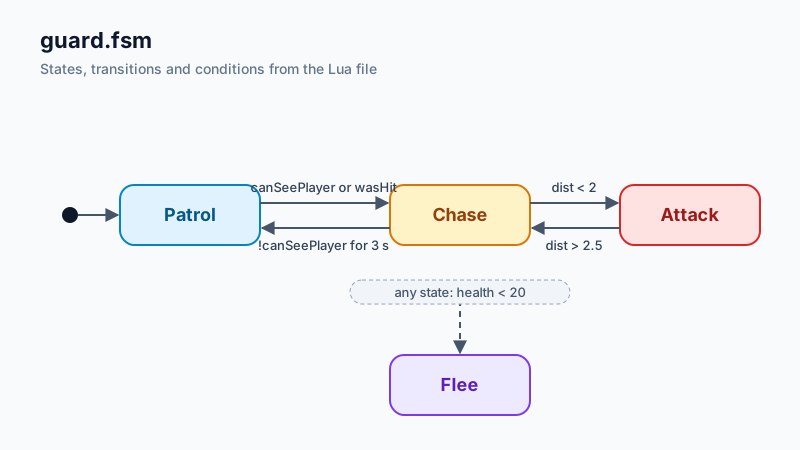
The same machine as a diagram:
2. Tell the build system about it
Add the asset type to AssetBuildFunctions.lua, the same way meshes and shaders are registered:
|
Then list your files in AssetsToBuild.lua:
|
Your asset build project also needs a dependency on StateMachineBuilder, so that the builder gets built first. I will give exact steps for this in the README.
3. Use it in the game
The public interface (namespace eae6320::AI, static library Engine/StateMachine) will look roughly like this:
|
- Callbacks are plain function pointers with a
void*user-data pointer, so they work with any game object type without templates or virtual functions. The signature isvoid (*)( cStateMachine&, void* i_userData ), and the update callback also gets the elapsed time. - Errors at load time come back as
cResult, like everything else in the engine. - Run-time cost. Strings are only needed when you look up handles. At run time a state machine works on integer indices, and the definition is one contiguous block of memory.
What I expect to implement
Run-time library (Engine/StateMachine):
cStateMachineDefinition:- loads the binary file with
Platform::LoadBinaryFile(); - gets its arrays out with pointer offsets, the same way meshes do since Assignment 08 (no per-element loops);
- looks up names to handles;
- reference counting.
- loads the binary file with
cStateMachine:- parameter storage (floats, bools, triggers that reset after each
Update()); - transition evaluation in priority order, including the “any state” list;
- time-in-state tracking;
- enter / update / exit callbacks.
- parameter storage (floats, bools, triggers that reset after each
- The platform-independent interface is in
.h/.cppfiles. The only platform-specific code is a small.win.cppfor the debug output (OutputDebugString) in the Windows implementation, following the pattern of the Concurrency library.
Builder (Tools/StateMachineBuilder):
- Reads the
.fsmfile with Lua, turns every state and parameter name into an index, and checks everything listed above. - Writes a binary file:
- a small header with counts;
- the parameter defaults;
- the states, each with the range of its transitions;
- the transitions, each with the range of its conditions;
- the conditions.
- Also writes the names into a separate block, so that handles can be looked up and debug messages can print names.
Demo in MyGame:
- An enemy with Patrol / Chase / Attack / Flee states that reacts to the player object we already move with the arrow keys.
- Every state uses a different color or mesh, so you can see the state change on screen.
Documentation:
- A README with the file format, the build setup and an API overview.
- Comments in the public headers.
Schedule:
| Date | Milestone |
|---|---|
| Update #1 (Nov 3) | File format final, builder working with validation, binary file loading into cStateMachineDefinition. |
| Update #2 (Nov 10) | cStateMachine run time with callbacks and debug output; demo enemy in MyGame. |
| Write-up (Nov 19) | Cleanup, README, a second example machine, and support for anyone who wants to use it in their final project. |
Challenges I expect
- Making conditions expressive without a scripting language at run time. Running Lua at run time would make the conditions very flexible, but it goes against what we did this semester: Lua is for build time, and the run time loads binary data. A fixed set of comparisons, combined with AND, covers most of what game AI needs. OR is possible by writing two transitions to the same state. The difficult part is choosing a format that stays this simple and is still useful.
- The binary layout. It has several variable-length arrays that refer to each other by index (states → transitions → conditions), plus the name strings. I want to load it without loops or per-element allocation, like the meshes. I’ll need to think about alignment, because the arrays mix 8-bit, 16-bit and 32-bit data.
- An API that is pleasant to use from someone else’s game. My classmates’ games will have their own game-object classes. Function pointers plus
void*user data keep the library independent from those classes, but it is easy to make that awkward to use. I’ll write the demo first, as a “user”, before I fix the interface. - Timing and determinism.
Update()will be called from the fixed-rate simulation update, so transitions happen on simulation ticks and not on render frames. I need to define clearly when a transition that fires duringUpdate()calls the exit and enter callbacks, and whether more than one transition can fire in a single tick (my plan is one per tick).
Stretch goals
- Hierarchical states: a state can contain its own sub-machine, e.g. Combat = { Approach, Strafe, Attack }, so that shared transitions like “lost the player” don’t need to be repeated.
- Weighted random transitions, for idle variety (e.g. 70% LookAround, 30% Wander).
- Event messages: one agent sends a named event to another agent’s state machine (an alarm that alerts every guard in a room).
- Hot reload of
.fsmfiles while the game is running, in Debug builds. - A Graphviz export in the builder, which draws the machine as a diagram. This would be nice to put in the README and the write-up.