GAMES 6320 · Assignment 06
A human-readable mesh format and a MeshBuilder
A human-readable mesh file format, a MeshBuilder tool, and loading meshes from disk.
Course: GAMES 6320-001 — Game Engineering II (Fall 2026)
Download (one click, ZIP): MyGame_Assignment06_Release_x64.zip
The ZIP contains a Direct3D Release build (
x64). Unzip it and runMyGame.exe.Controls:
Key What it does Arrow keys Move the colored object left / right / up / down Space(hold)The colored object becomes a triangle instead of a square A/DMove the camera left / right W/SMove the camera forward / back EscExit
1. What the assignment was about
Until last week every mesh in my game was an array of numbers typed into cMyGame.cpp.
Changing the shape of anything meant changing C++ code and recompiling the game. This
assignment moves geometry out of the code and into asset files:
- Every mesh is now a file in the game’s
Content/Meshesfolder, written in a format that I
designed. - The asset build system has a new builder, MeshBuilder, that “builds” those files into the
game’sdata/folder. - The engine’s mesh factory function no longer takes vertex and index arrays; it takes the
path of a mesh file, reads it, and creates the GPU buffers from what it read.
The file format is Lua, which my engine already uses for its build scripts. A Lua file thatreturns a table is a very convenient data format: it has arrays, dictionaries, numbers,
strings and comments, and the engine already has a Lua library to read it.
2. Why human-readable asset files?
- You can open them and see what is wrong. When something renders incorrectly the first
question is “is the data wrong or the code wrong?”. With a text file I can open the mesh and
read the positions and triangles directly, without writing a tool first. - Small changes don’t need a programmer or a recompile. Moving one vertex is editing one
number and rebuilding the assets. The game’s code doesn’t change at all. - They work with source control. A diff of a text file shows exactly which vertex changed.
A diff of a binary file only says “the file changed”. - The format can grow. Because data is labelled by name, a newer version of the format can
add things (vertex colors, normals) and old files keep working.
The cost is that text is bigger and slower to parse than binary. That doesn’t matter for a
source file, because the plan is to convert it into a compact binary file at build time.
The human-readable file is for people, and the built file will be for the game.
3. My mesh file format
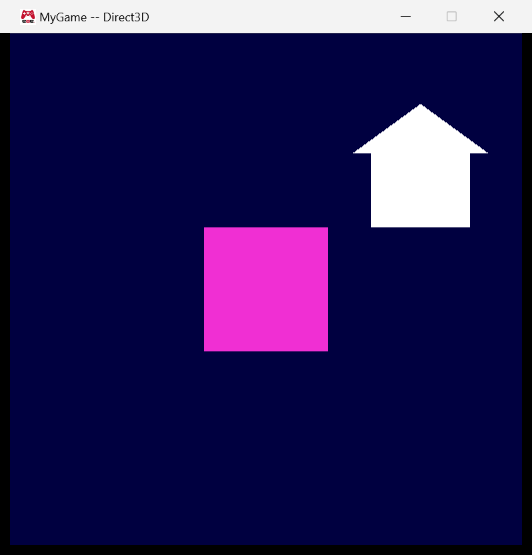
This is house.mesh, the white house in the screenshot:
|
Why it looks like this
For every piece of data I asked the question from the lecture: does the order matter?
| Data | Order matters? | So it is a… |
|---|---|---|
The top-level table (vertices, triangles) |
No | dictionary |
| The list of vertices | Yes — triangles refer to vertices by their position in the list | array |
| One vertex | No — a vertex is a bag of attributes | dictionary (position = …) |
| A position | Not really (x, y, z) | dictionary (x =, y =, z =) |
| The list of triangles | Arbitrary, but there must be some order | array |
| One triangle | Yes — the order of its three indices is the winding order | array of 3 |
Some specific decisions:
- A vertex is a dictionary, even though it only has one entry. I could have written a vertex
as just{ -0.4, -0.5, 0.0 }. It is shorter, but it only works as long as a vertex is nothing
but a position. Next week vertices get a color; with my format that is a new named entry
(color = { … }) next toposition, and files without a color can still be read. - x, y and z are named. The lecture said an array would also be fine here, because anyone who
knows a little graphics reads{ -0.4, -0.5, 0.0 }as x, y, z. I chose names anyway because the
file is meant to be read by people who are debugging, andy = 0.5can’t be misread. - Indices are grouped into triangles. A flat list
0, 1, 2, 0, 2, 3, 4, 5, 6is what the GPU
wants, but it hides where one triangle ends. Grouping by three makes every line one triangle,
and adding or removing a triangle is adding or removing one line. - Indices start at 0. Lua arrays start at 1, so I had to choose. I went with 0 because that is
what the engine and the GPU use, and the file states it explicitly in a comment. The loader
does the conversion. - No counts. There is no
vertexCountortriangleCount: the loader counts the entries.
A count in the file would be redundant data that can be wrong, and then the file
contradicts itself. - Comments carry the helpful but optional information. The
-- [4] left eavecomments give
each vertex its index and a name. That is exactly the kind of information that helps a person
but that the format must not require. Lua comments are ignored by the machine, so a person
(or, later, an exporter) can add as many as they like. - The winding order is fixed and documented. Triangles are always counter-clockwise
(right-handed), and the engine reverses them for Direct3D when it loads the mesh. Callers never
have to think about which platform they are on.
The extension is .mesh. The built file currently has the same name, because MeshBuilder
simply copies the file; when it starts writing a binary format the built file can get a
different extension without the game noticing anything besides a path change.
4. Building and loading mesh files
MeshBuilder is a new console application in Tools/. Its Build() function copies the source
file to the target path using the engine’s platform-independent Platform::CopyFile(), overwrites
an existing target, updates the target’s file time so the build system knows that it is up to
date, and reports any failure with OutputErrorMessageWithFileInfo() so that it shows up in Visual
Studio’s Error List.
AssetBuildFunctions.lua registers the new asset type:
|
and the game lists its meshes in AssetsToBuild.lua:
|
BuildMyGameAssets runs MeshBuilder.exe, so I made it depend on the MeshBuilder project. (It is
not a reference: BuildMyGameAssets doesn’t link with MeshBuilder; it just needs the program to
exist before it can build.)
The game now loads its meshes like this:
|
Inside cMesh::Load() I read the file with one small function per table level
(LoadVertices(), LoadVertex(), LoadPosition(), LoadTriangles(), LoadTriangle()). Each one
starts with a comment saying what is on top of the Lua stack, and each one pops exactly what it
pushed. That was the single most useful habit for this assignment: Lua stack bugs are invisible
in the debugger, so making every function responsible for one level kept the stack easy to
reason about.
The loader is strict and specific about errors. A missing position, an index that refers to a
vertex that doesn’t exist, a triangle with two indices, or a file that doesn’t return a table
all produce a log message that names the file and the vertex or triangle, and the game then
exits with its normal error message instead of rendering garbage.
5. Screenshots
The game looks the same as last week on purpose, except that the white landmark is now a house
that comes from house.mesh:
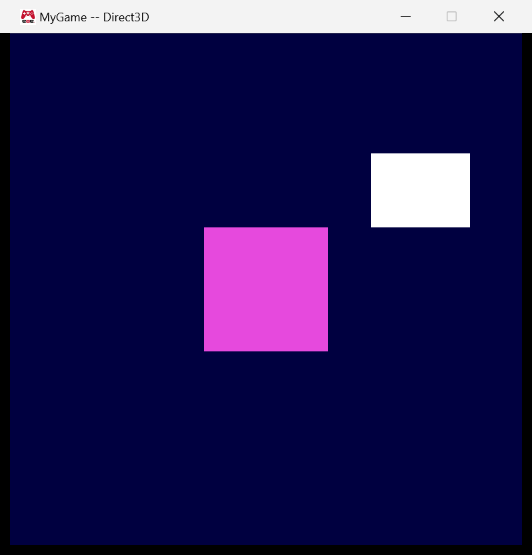
As a test I deleted the roof’s three indices { 4, 5, 6 } from house.mesh, rebuilt only the
assets, and ran the game without changing any code. The roof is gone:
6. Debugging MeshBuilder
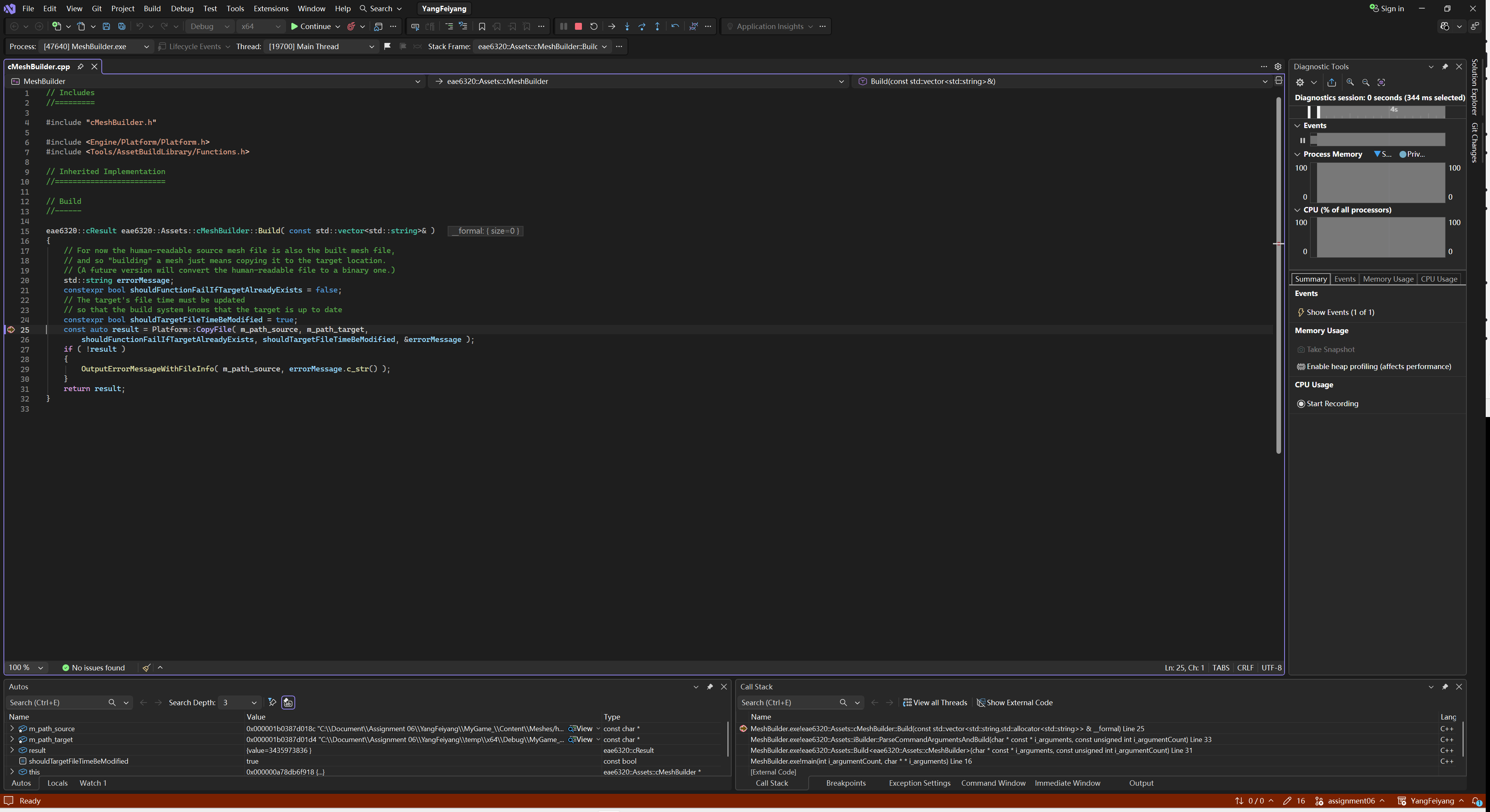
To debug MeshBuilder I set it as the startup project and gave it the same command arguments that
the asset build passes to it (the source path of a mesh and its target path in the game’s data
folder). Here it is stopped in cMeshBuilder::Build(), just before the copy, with the source and
target paths visible in the Autos window:
7. Build / test
All four configurations (Debug|x64, Release|x64 for Direct3D and Debug|x86, Release|x86 for
OpenGL) build from scratch without errors or warnings, and both platforms render the same scene.
Building only the game project and running it shows the “Initialization failed” message and exits;
after building only BuildMyGameAssets the game runs.
8. Reflection
The design of the file format took longer than the code. My first version was very compact —
vertices as { x, y, z } arrays and one flat index list — and it was easy to write but hard to
check: to find the roof I had to count indices in threes. Grouping indices into triangles and
naming everything made the file longer, but now I can read a triangle and see which vertices it
uses without counting anything.
Thinking about next week while designing helped. Making each vertex a dictionary costs a few
characters per line today, but it means adding a vertex color will not break a single existing
mesh file.
Strict validation in the loader paid off immediately: when I typed a wrong field name while
testing, the log said exactly which vertex in which file was wrong, instead of the mesh just not
showing up.
What I would change in a real engine: parsing Lua at run time is the slowest possible way to load
geometry. The right place for all of this code is MeshBuilder, which should read the
human-readable file once at build time and write a binary file that the game can load with
almost no work — including doing the Direct3D winding-order swap there instead of every time the
game starts.